
Platform overview
Face attendance on the IP cameras you already have
Attendance with existing cameras: walking through the gate clocks in and out by face, masks included. Data flows into HRM.
The real-world problem
Fingerprint readers and swipe cards: shift end brings queues, a forgotten card wastes time, and buddy punching is hard for HR to catch. Month-end reconciliation is manual and error-prone. This application turns existing gate cameras into attendance points: staff walk through and are clocked by face, with the data flowing straight into the HR software.

Recorded: John Smith · Sewing team 3
Plant gate · 14:32:05
How it works
01
Register staff, connect the gate cameras
Each employee registers up to 5 face photos (all 5 from several angles recommended) with an employee ID, grouped by department. Existing IP cameras at gates and lobbies connect to Vaidio AI Vision.
02
AI recognizes and clocks in real time
The system recognizes a face in under a second, several people at once in a frame, masks included; glasses wearers are recognized reliably. Each pass is recorded with time, camera and photo evidence.
03
Data reaches HR
Attendance history exports to Excel, or each record flows into HRM with name, employee ID, camera, timestamp and photo; workdays, overtime and payroll compute in the software the business already runs.
Real-world applications
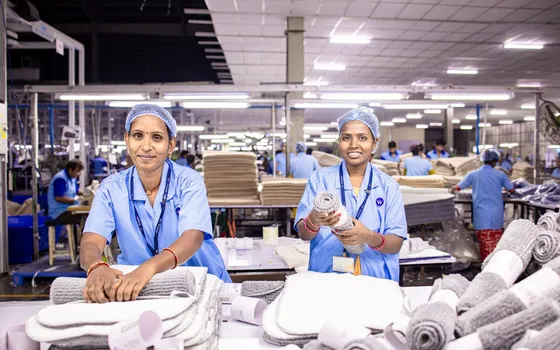
Large plants and workshops
No more fingerprint queues at shift end: workers are clocked walking through the gate without stopping.
Offices and store chains
Staff across floors and branches are all recorded; attendance flows into HRM.

Schools and education
The same mechanism takes student attendance: class entries recorded and fed to the school's software.

Resolving attendance disputes
Look up attendance events by time window with the actual face, download the event image and clip for reconciliation.
What you get
Attendance recorded on every pass
Each gate pass stores name, employee ID, camera, timestamp and photo; the timesheet aggregates per shift instead of merging files by hand.
Shift end without a queue
Several faces are recognized in one frame, so people keep walking; no queue in front of a terminal.
Buddy punching reduced by face verification
Every pass keeps a photo; with the anti-spoofing engine (separate license) each recognition is labeled real or fake for later filtering.
Disputes settled on evidence
Look up events by time window and employee, download the photo and video clip right away to reconcile with the timesheet.
How deployment works
Step 1
Survey gates and traffic
Check gate cameras and lobbies; map shift-end flows, mounting spots and barrier connection needs.
Step 2
Pick the deployment shape
On-site server or edge devices for small sites; data stays inside the business.
Step 3
Register faces and connect
Each employee registers up to 5 sample photos with an ID; cameras connect over ONVIF or RTSP, work hours flow into the HR software.
Step 4
Tune and operate
Tune for each gate lighting, run in parallel with the old method for a few shifts, then optimize.
Infrastructure requirements: IP cameras from 720p, 2MP recommended at gates. On-site server or edge devices for small sites. Existing cameras, recorders and HR software stay in place.
Frequently asked questions
Can buddy punching with a photo or video get through?
There is a defense: enable the Anti-Spoofing engine (separate license bundled with face recognition). It checks whether the face is real or a printed photo or phone screen, and labels each pass; alert rules can require a real face.
What about missed punches and off-shift overtime?
Corrections, shift and overtime rules are handled in the business's HRM; Vaidio supplies the in/out data for reconciliation. To recheck an event, search by person and time window with photo evidence.
Is face and attendance data secure?
Face data and clock records stay inside the business's system (on-site server or edge devices). With privacy protection enabled, faces in results are blurred, with unblur permission for authorized roles only.
Related features
Put AI Vision to work in your operations
Turbo Solutions surveys your current system, demos against your real operating scenarios and quotes by scope of work. No disruption to daily operations.
Book a demo